Ultra-Realistic Portrait AI Prompt for Stunning 4K Results
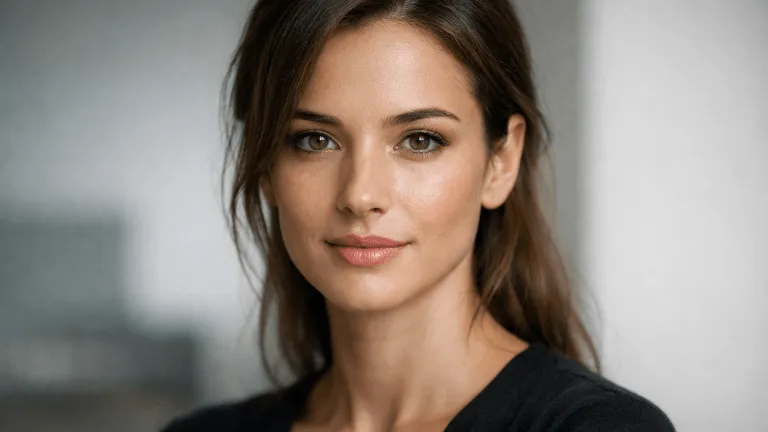
Ultra-Realistic Portrait AI Prompt for Stunning 4K Results
Category: AI Prompts
Intent: Informational
Introduction
Artificial Intelligence has transformed digital art and photography forever. One of the most in-demand use cases today is generating ultra-realistic AI portraits that look indistinguishable from DSLR or studio photography. Whether you are a content creator, designer, marketer, or AI enthusiast, mastering a high-quality ultra realistic portrait AI prompt can unlock breathtaking 4K results.
In this guide, you’ll learn what makes portraits look realistic, how to structure a powerful AI prompt, lighting techniques, recommended AI tools, and frequently asked questions—all in one complete resource.
What Makes AI Portraits Look Ultra-Realistic?
Realism in AI portraits is not accidental. It’s a combination of multiple visual and technical elements working together. When written correctly, a prompt can guide the AI to replicate professional photography.
1. Skin Texture & Details
Ultra-realistic portraits avoid plastic or overly smooth skin. Instead, they include:
- Natural pores and fine lines
- Subtle imperfections
- Balanced skin smoothing
2. Lighting Accuracy
Lighting defines realism. Natural daylight, soft studio light, or cinematic rim lighting helps add depth, contrast, and realism.
3. Camera & Lens Simulation
Mentions of DSLR cameras, focal lengths (like 85mm), and shallow depth of field dramatically improve realism.
4. Color Grading
Muted tones, cinematic color grading, and accurate white balance prevent the image from looking artificial.
5. Facial Expression & Composition
Natural expressions, relaxed poses, and professional framing elevate the realism significantly.
Full Ultra-Realistic Portrait AI Prompt
Use the following prompt to generate highly detailed and professional-grade portraits:
Ultra-realistic human portrait, flawless yet natural skin texture with visible pores,
soft natural daylight lighting, evenly diffused light with no harsh shadows,
cinematic color grading, high dynamic range, sharp focus, DSLR camera look,
85mm lens, shallow depth of field, realistic facial proportions,
subtle skin imperfections, calm and confident expression,
clean minimal background, ultra-detailed, professional portrait photography,
8K resolution, photorealistic, editorial quality
This prompt is designed to work across most AI image generation platforms and can be customized based on age, gender, mood, or environment.
Lighting Techniques for Realistic AI Portraits
Natural Daylight
Perfect for lifestyle or influencer portraits. Produces soft shadows and authentic skin tones.
Studio Softbox Lighting
Ideal for clean, professional headshots with evenly distributed light.
Cinematic Lighting
Adds drama using rim light, backlight, or Rembrandt-style lighting for depth.
Golden Hour Lighting
Warm tones and gentle highlights create emotional and artistic portraits.
Best AI Tools for Ultra-Realistic Portraits
- :contentReference[oaicite:1]{index=1} – Excellent realism and cinematic portraits
- :contentReference[oaicite:2]{index=2} – Full control with custom models and LoRAs
- :contentReference[oaicite:3]{index=3} – Clean and accurate facial rendering
Each tool has strengths, but combining a strong prompt with the right model is the real secret.
Prompt Customization Tips
- Add age, ethnicity, or profession for more specificity
- Use negative prompts to avoid blur or distortion
- Specify background mood (studio, outdoor, urban)
- Adjust resolution and sharpness keywords
Frequently Asked Questions (FAQs)
1. What is an ultra-realistic portrait AI prompt?
It is a detailed text instruction that guides AI to generate portraits that closely resemble real photographs.
2. Can AI portraits look like real humans?
Yes, with correct lighting, texture, and camera details, AI portraits can be nearly indistinguishable from real photos.
3. Which resolution is best for realistic portraits?
4K or 8K resolutions provide maximum detail and realism.
4. Do I need camera terms in prompts?
Absolutely. Lens type, focal length, and camera style significantly enhance realism.
5. What lighting works best?
Soft natural daylight or studio softbox lighting delivers the most realistic results.
6. Can I use these prompts commercially?
It depends on the AI tool’s license and terms of service.
7. Why does my portrait look fake?
Over-smoothing, poor lighting terms, or missing camera details usually cause unrealistic results.
8. Are negative prompts important?
Yes, they help remove blur, distortion, and artificial artifacts.
9. Can beginners use this prompt?
Yes, this prompt is beginner-friendly and customizable.
10. How do I improve facial realism further?
Add micro-details like skin pores, subtle imperfections, and realistic expressions.
Conclusion
Mastering an ultra-realistic portrait AI prompt is a powerful skill in today’s AI-driven creative world. By combining precise lighting, camera simulation, and detailed descriptors, you can consistently generate stunning 4K portraits that rival professional photography.
Use this guide as your foundation, experiment with variations, and push your AI portrait creations to the next level.
Did you find this helpful?
Show your support! Your feedback helps us create more amazing content.