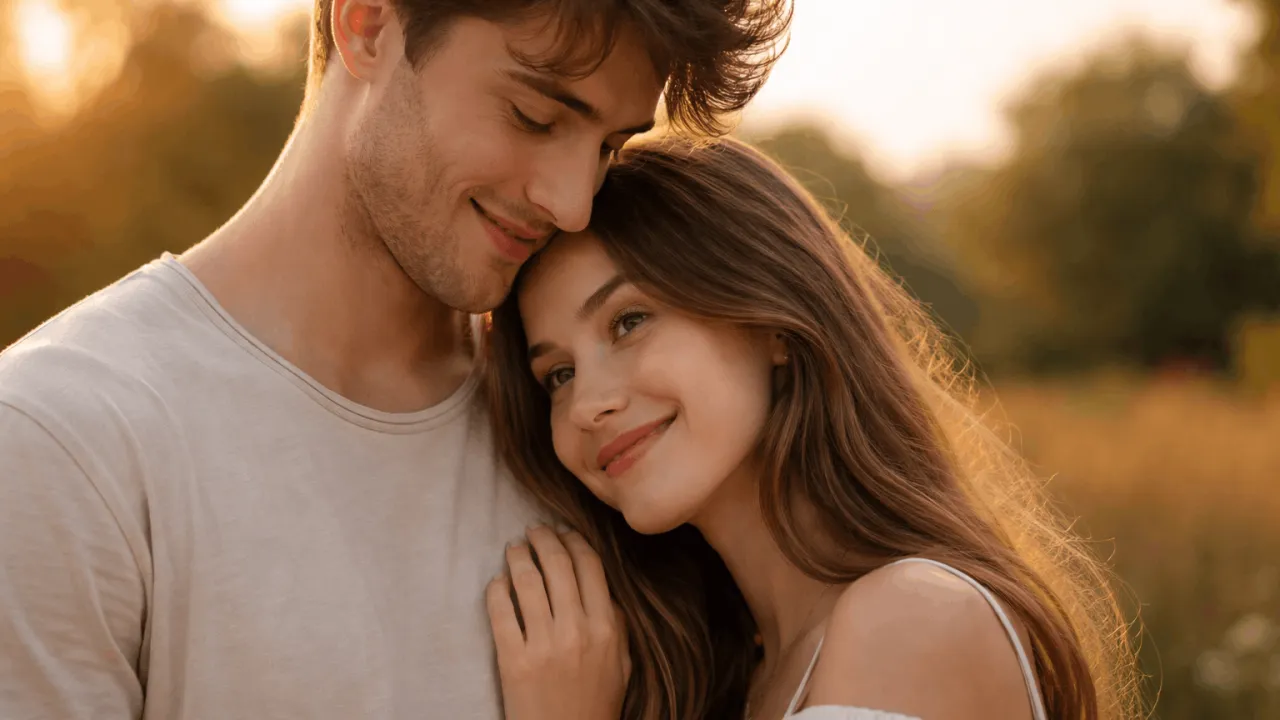
Generate Cinematic Family Silhouette AI Prompt (4:5)
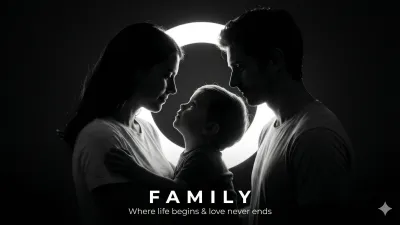
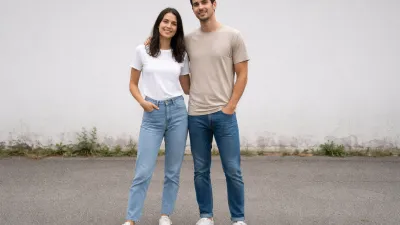 BeforeAfter
The Prompt
Use the uploaded image STRICTLY as a facial identity reference for all subjects. Preserve exact facial structure, skin tone, age, proportions, and likeness. Do NOT modify or stylize faces.

Create a 4:5 aspect ratio, ultra-realistic, high-contrast black-and-white cinematic silhouette portrait of a family (mother, father, and child), capturing a deep emotional connection in a minimal studio setting.

--- COMPOSITION ---
• Three subjects arranged in a tight triangular composition
• Child centered, slightly looking upward toward the mother
• Mother on one side, father on the opposite side
• Both parents gently leaning inward toward the child
• Parents’ heads slightly tilted downward, expressing warmth and protection
• Only side or semi-side profiles visible (NO direct front-facing angles)

--- LIGHTING (CRITICAL PRIORITY) ---
• Single strong backlight source (bright circular or oval halo) directly behind subjects
• Subjects rendered as dark silhouettes with clean, glowing rim light edges
• Zero front lighting — faces remain mostly in shadow
• Strong subject-to-background separation using a soft light halo
• Smooth gradient falloff from light to pure black background

--- STYLE & MOOD ---
• Minimalist, timeless, emotional storytelling
• Deep blacks, bright whites, NO mid-tone clutter
• Cinematic, studio-quality lighting control
• Soft glow around edges, clean negative space

--- DETAILS ---
• Subtle edge definition of hair, nose, lips, and clothing outlines
• Natural, relaxed posture (NOT stiff or overly posed)
• Simple, non-distracting clothing with clean silhouettes

--- OPTIONAL TEXT (BOTTOM CENTER) ---
“FAMILY” — bold uppercase, wide letter spacing
Subtext: “Where life begins & love never ends”

--- OUTPUT QUALITY ---
• Ultra-realistic, razor-sharp edges
• Cinematic photography style
• High dynamic range, 8K detail, noise-free

--- NEGATIVE PROMPT ---
color, low contrast, flat lighting, front lighting, visible facial details, direct eye contact, smiling at camera, cartoon, illustration, CGI look, blur, distortion, extra people, cropped bodies, bad anatomy, cluttered background

Want to create a deeply emotional, cinematic family portrait using AI? This powerful prompt helps you generate stunning black-and-white silhouette images that feel timeless, artistic, and professional.
Whether you're a designer, content creator, or AI enthusiast, this prompt is crafted to deliver high-quality, identity-preserving portraits with a dramatic cinematic feel.
What Is This Prompt?
This is an advanced AI image generation prompt designed to create a black-and-white cinematic silhouette portrait of a family (mother, father, and child). It ensures strict facial identity preservation using a reference image while focusing on emotional storytelling through lighting and composition.
The prompt emphasizes high contrast, rim lighting, and minimalism to produce a timeless visual that feels like a professional studio photograph.
Use our powerful AI Image Prompt Generator tool to quickly create cinematic, realistic, and detailed prompts for your images without writing everything manually.
What Does This Prompt Do?
This prompt guides AI tools to generate:
- Emotionally powerful family portraits
- High-contrast black-and-white silhouettes
- Perfect triangular composition with a child-centered focus
- Accurate identity preservation using a reference image
- Professional cinematic lighting with rim highlights
It eliminates common AI issues like distortion, extra elements, and poor lighting, resulting in clean, artistic output.
👉 50 Trending Family Photo Prompt ChatGPT Ideas
Who Should Use This Prompt?
- Graphic Designers: For portfolio or client work
- Content Creators: For emotional storytelling visuals
- Photographers: For concept visualization
- Bloggers: For family, lifestyle, or emotional content
- AI Artists: For creating high-quality prompt outputs
Key Features & Benefits
- Strict Face Identity Preservation – Keeps real likeness intact
- Cinematic Lighting – Dramatic backlight with glowing edges
- Minimal Composition – Clean, distraction-free output
- Emotional Depth – Captures love, connection, and warmth
- High Resolution Output – Designed for 8K-quality visuals
- Professional Studio Feel – Perfect for premium designs
Recommended AI Tools for Best Results
- Midjourney: Best for artistic and cinematic visuals
- DALL·E: Great for accurate identity and realism
- Stable Diffusion: Ideal for custom fine-tuning
How to Use This Prompt (Step-by-Step)
- Upload a clear reference image of the family (faces must be visible)
- Copy the prompt below
- Paste it into your preferred AI tool (Midjourney / DALL·E)
- Attach or reference the uploaded image
- Run the generation process
- Adjust parameters (if needed) for sharper or more dramatic results
Example (Midjourney)
Use the prompt with an image URL and add parameters like --ar 4:5 --v 6 --style raw
Variations of Cinematic Family Silhouette Portrait Prompt
1. Emotional Close-Up Family Silhouette Portrait
This variation focuses on a tighter composition, bringing the subjects closer together to highlight emotional bonding and facial outlines. Ideal for creating intimate, heartfelt visuals with stronger emotional impact.
Use the uploaded image ONLY for face and identity reference of all subjects. Do not alter facial structure, skin tone, age, or likeness. Maintain accurate identity for each person.
Create a close-up 4:5 aspect ratio, high-contrast black-and-white cinematic silhouette portrait of a family (mother, father, and child) with tightly framed composition.

Composition & Pose:
Subjects positioned very close together, heads nearly touching
Child centered, looking upward toward mother
Parents gently leaning inward, forming a protective frame
Only side profiles visible, tightly cropped

Lighting:
Strong circular backlight behind heads
Sharp rim lighting outlining facial features
No front light, deep shadows dominate

Style:
Highly emotional, intimate, minimal, cinematic
Deep blacks and bright whites only

Negative Prompt:
color, blur, extra people, distortion, front lighting, cartoon
2. Wide Cinematic Family Silhouette Scene
This version expands the composition into a wider frame, adding more breathing space around the subjects. Perfect for cinematic posters or storytelling visuals with a grand feel.
Use the uploaded image ONLY for identity reference. Maintain exact facial features.
Create a wide 4:5 cinematic black-and-white silhouette portrait of a family (mother, father, child) with more surrounding negative space.

Composition:
Subjects centered with space around them
Triangular pose maintained
Child in middle, parents leaning inward

Lighting:
Large glowing oval light behind subjects
Strong halo effect with soft gradient fade

Style:
Minimalist, cinematic, storytelling composition
High contrast, studio feel

Negative Prompt:
color, cluttered background, extra subjects, flat lighting
3. Artistic Soft Glow Family Silhouette
This variation softens the lighting slightly, introducing a gentle glow around the silhouettes for a more dreamy and artistic appearance while maintaining contrast.
👉 15+ Best Family Photo Prompts for AI (Stunning & Realistic)
Use uploaded image for identity reference only. Do not change facial structure.
Generate a 4:5 black-and-white cinematic silhouette family portrait with soft glowing edges and artistic mood.

Composition:
Mother, father, child in triangular layout
Child centered, parents leaning inward

Lighting:
Soft but bright backlight
Gentle rim glow around edges
Smooth gradient transition

Style:
Dreamy, emotional, artistic
Soft highlights with deep shadows

Negative Prompt:
harsh lighting, color, distortion, cartoon
4. Minimal Studio Family Silhouette Portrait
This variation emphasizes a clean, studio-style aesthetic with ultra-minimal elements. Perfect for professional portfolios and modern designs.
Use uploaded image only for identity reference. Keep facial features exact.
Create a 4:5 ultra-minimal black-and-white studio silhouette portrait of a family.

Composition:
Simple triangular arrangement
Child center, parents angled inward

Lighting:
Single strong backlight
Clean halo separation
Pure black background

Style:
Minimal, modern, studio photography
No distractions

Negative Prompt:
background elements, props, color, blur, extra people
5. High-Drama Cinematic Family Silhouette
This variation increases contrast and lighting intensity to create a bold, dramatic visual. Ideal for posters, storytelling, and high-impact designs.
Use uploaded image strictly for identity reference. Maintain exact likeness.
Create a high-drama 4:5 black-and-white cinematic silhouette portrait of a family.

Composition:
Strong triangular pose
Child centered, parents leaning in dramatically

Lighting:
Extremely bright backlight
Sharp, intense rim lighting
Deep blacks with no mid tones

Style:
Bold, dramatic, cinematic masterpiece
High contrast, intense mood

Negative Prompt:
soft lighting, color, blur, weak contrast, cartoon
Pro Tips for Better Results
- Use high-resolution reference images for best identity accuracy
- Choose images with clear side profiles for better silhouette output
- Adjust contrast settings in your AI tool if output looks dull
- Experiment with slight variations in lighting intensity
- Keep backgrounds simple to maintain focus on subjects
Best Use Cases
- Family-themed blog thumbnails
- Emotional social media posts
- Wall art and printable designs
- Photography concept creation
- Personalized gifts or keepsakes
Common Mistakes to Avoid
- Using low-quality or blurry reference images
- Adding unnecessary elements in the prompt
- Ignoring lighting instructions (critical for silhouette effect)
- Using front-facing images instead of side profiles
- Overcomplicating composition with extra subjects
Conclusion
This cinematic family silhouette prompt is more than just an image generator—it's a storytelling tool. It captures emotion, connection, and timeless beauty in a single frame.
If you're serious about creating high-quality, scroll-stopping visuals, this prompt is a must-use.
Copy it, test it, and start generating stunning family portraits today.
Frequently Asked Questions (FAQs) about Generate Cinematic Family Silhouette AI Prompt (4:5)
Did you find this helpful?
Show your support! Your feedback helps us create more amazing content.