Old Image to 8K Upscale – Ultra-Realistic DSLR Quality Enhancement
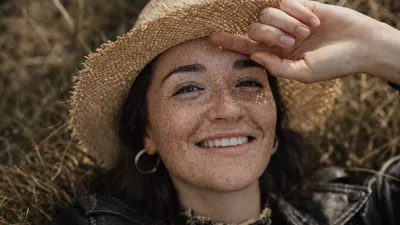
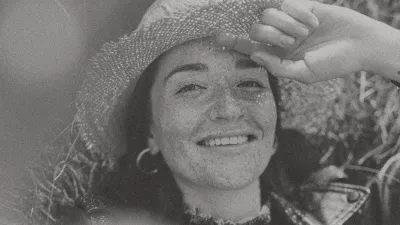 BeforeAfter
The Prompt
Use the original image as a strict reference and preserve 100% identity, face structure, pose, and composition. Perform ultra-high-resolution 8K upscaling with maximum detail enhancement. Add realistic skin texture with visible pores, fine lines, and natural imperfections, avoiding any plastic or artificial smoothing. Enhance facial details including sharp eyes, realistic eyelashes, natural eyebrows, detailed lips, and individual hair strands. Apply professional DSLR camera quality using a full-frame camera look with a premium 85mm or 50mm lens. Improve lighting with a natural key light, soft fill light, and subtle rim light to separate the subject from the background. Increase clarity and sharpness naturally without over-sharpening. Balance highlights and shadows with improved dynamic range and true-to-life colors. Reduce noise and compression artifacts while preserving original texture. Apply cinematic yet realistic color grading with accurate skin tones and authentic depth of field. Output should look ultra-photorealistic, high-end studio quality, DSLR-level realism. Negative prompt: over-smoothed skin, plastic face, cartoon style, anime, painterly look, AI artifacts, distorted face, fake skin texture, blur, low detail, harsh sharpening, oversaturation, unrealistic lighting, color bleeding, noise artifacts, resolution issues. "7680x4320", "quality": "high", "photorealistic", "DSLR", "detail_level": "maximum", "identity_preservation": "reference_image", "noise_reduction": "high without texture loss", "sharpening": "natural and controlled", "lighting": "realistic studio lighting", "camera": { "type": "DSLR", "sensor": "full-frame", "lens": "85mm portrait lens", "aperture": "f/1.8" }, "strength": 1.0 Turn your old, low-resolution images into ultra-high-definition 8K portraits with advanced AI enhancement technology. This process upgrades image clarity while strictly preserving facial identity, structure, and natural details.
What This Enhancement Does
- Upscales old images to true 8K resolution (7680x4320)
- Enhances facial features without altering identity
- Restores natural skin texture with visible pores
- Improves sharpness without harsh over-processing
- Reduces compression artifacts and digital noise
- Simulates DSLR full-frame camera quality
- Applies realistic studio lighting refinement
Ultra-Realistic DSLR Portrait Simulation
The enhanced image is refined to mimic a professional DSLR portrait captured using an 85mm lens at f/1.8 aperture. This creates natural depth of field, authentic background separation, and balanced highlight control.
Natural Texture Preservation
Unlike basic AI filters that create plastic skin or artificial smoothness, this process maintains natural imperfections, fine lines, and true-to-life skin detail for a realistic finish.
Advanced Lighting & Dynamic Range Improvement
Lighting is optimized using a soft key light, fill light, and subtle rim light simulation. Highlights and shadows are balanced to improve depth without overexposure or unnatural contrast.
Ideal For
- Old family portraits
- Vintage photographs
- Low-resolution digital images
- Framing and large prints
- Memory preservation projects
Final Result
The final output delivers ultra-photorealistic clarity with professional studio-level quality, making your old image look like it was captured with a modern high-end DSLR camera.